

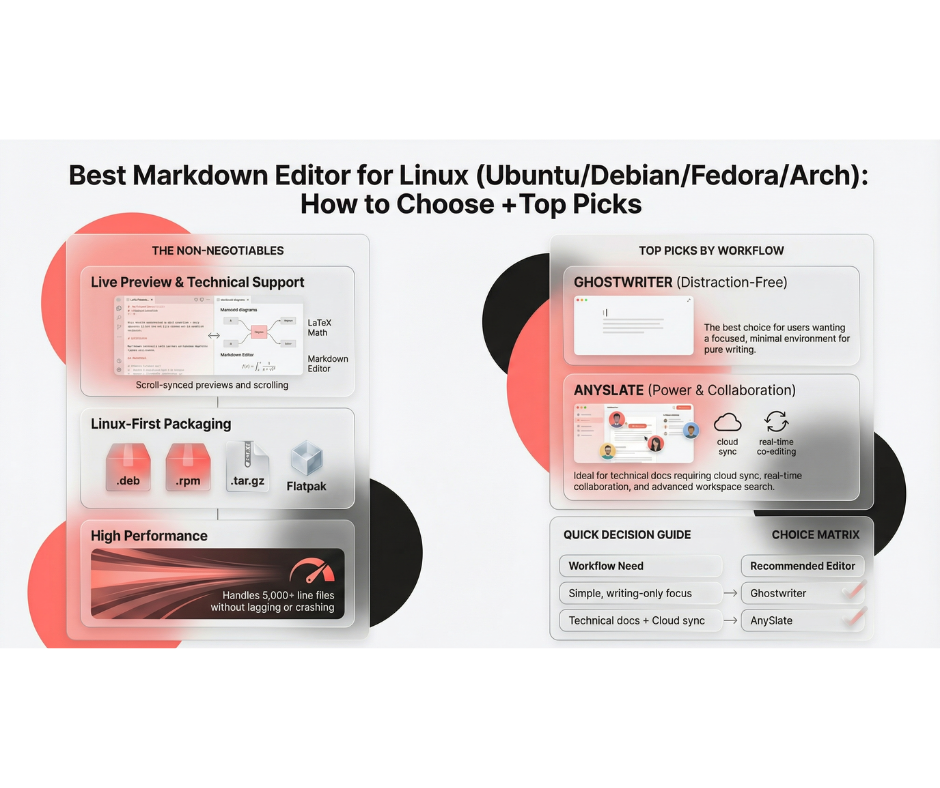
What Linux users should look for in a Markdown editor (the non-negotiables)
1) Live preview that doesn’t feel like a second job
A good Linux Markdown editor should have:
live preview
scroll sync (or at least predictable scrolling)
clean rendering of tables, code blocks, task lists
2) Export: PDF and HTML (because you will need it eventually)
Even if you “only take notes,” you’ll eventually need to send a doc to someone who doesn’t care about .md files.
3) Mermaid + LaTeX (for technical writing that’s not just text)
Search intent keywords: markdown editor with mermaid linux, markdown editor with latex linux.
Diagrams and math support separates “basic editors” from “serious documentation tools.”
4) Packaging and updates
For Linux, install friction matters. You don’t want to fight dependencies just to write.
Top picks: Best Markdown editors for Linux (by workflow)
If you want a distraction-free editor (writer-friendly, clean UI): Ghostwriter
Ghostwriter is a well-known Linux-friendly choice when you want a focused writing environment with preview.
If you want a modern, cross-platform Linux Markdown editor (local + cloud, publish, collaboration): AnySlate
If your definition of “best markdown editor for Linux” includes: local files + cloud sync + real-time collaboration + publish to web, AnySlate is built around that set of needs. It supports Linux downloads (.deb / .rpm / .tar.gz), live preview with TOC + scroll sync, Mermaid + LaTeX, and export to PDF + standalone HTML.
What makes it Linux-friendly (in practical terms):
local file support (work offline)
workspace folders + advanced search (good for repo docs and knowledge bases)
high performance approach (caching/virtualization) when docs get large.
Quick decision: which Linux Markdown editor should you pick?
If you’re stuck between options, use this:
You want the simplest writing-only app → pick a distraction-free editor like Ghostwriter.
You want one editor that can handle notes + docs + publishing + syncing across machines → pick a cross-platform editor built for that workflow i.e AnySlate.